
The need
If you use Claude a lot, you know the feeling: you are in the middle of something and you hit your usage limit, with no warning, forced to stop working until the next reset. It happens to me all the time.
So I looked for a tool that could help me see how much I was using, but all the ones I found required opening the browser’s developer tools and copying a session cookie by hand. An awkward method and certainly not within everyone’s reach.
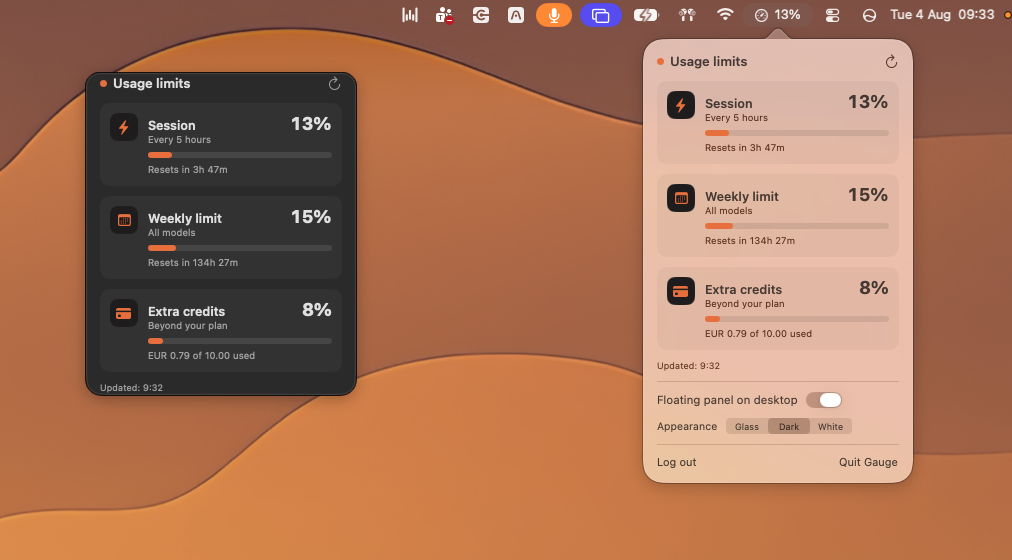
So I decided to try to create a Mac app that would be simpler: a login to hook into your own limits, an icon in the status bar and a floating window for anyone who wants something more complete.
How it works
The process is not all that different from the one I used to build Flowy: I explained to Claude Code what I wanted and then we wrote the app in Xcode. An app that “speaks” both Italian and English and updates the numbers every minute and a half.
The hardest part was the login. I wanted people to sign in with their real Claude account. Doable, but with a limit: it works if you use your email to log in, but it fails if you choose Google sign-in, because Google itself (rightly) blocks sign-in from any window that is not a real browser, as a measure against phishing.
After a few attempts that led nowhere, we realised that the most reliable way was also the simplest: a message tells you to enter your email, avoiding third-party login. Once you have entered the email, the user receives a one-time code directly from Anthropic, types it into the login window, and that is it.
Today Gauge is an app that lives permanently in my Mac’s status bar. With one click it shows the usage of the session and of the week, plus extra credits if you use them. It only works with Claude’s paid plans, because on the free plan the limits work differently and the counter cannot follow them. There is also a floating panel, which can be switched on and customised by choosing among three versions: light, dark or glass effect.
Where it stands
Gauge is signed and notarised, but it is not on the App Store and not available for public download; I am happy to share it with anyone who needs it. It is not an official product and it could stop working if Anthropic changes something.