

Meet Gauge: a tiny menu bar app for keeping an eye on your Claude usage

If you use Claude a lot, you know the moment: you’re deep into something and suddenly you hit your usage limit. No warning, no glance-and-know. You have to stop, dig into settings, and only then find out how close you actually were.
I use Claude daily, sometimes for hours at a stretch, and this kept happening to me. I looked around for something that could just show me – at a glance, without clicking into anything – how much of my 5-hour session and weekly limit I had left. What I found were a handful of unofficial tools, and every single one asked me to open my browser’s developer tools, dig around, and manually copy a session cookie to make them work. As someone who isn’t a developer, that instruction alone was enough to make me give up. It felt needlessly technical for something that should be simple.
So I decided to build the tool I couldn’t find.
What I wanted
In the past few months I’ve learned to work closely with AI coding tools to build real things and this felt like a good excuse to push that further. I wanted something that:
- lived quietly in the menu bar, not one more browser tab to remember
- could optionally float on the desktop, for when I want it always in view
- looked like it belonged on a Mac: clean, native, no clutter
- didn’t require me (or anyone else) to touch a browser console
What Gauge does
Click the icon in your menu bar and you get your session and weekly usage at a glance, plus extra credits if you use them. There’s also an optional floating panel, in three looks — glass, dark, or light — so it stays readable no matter what’s behind it on your desktop.
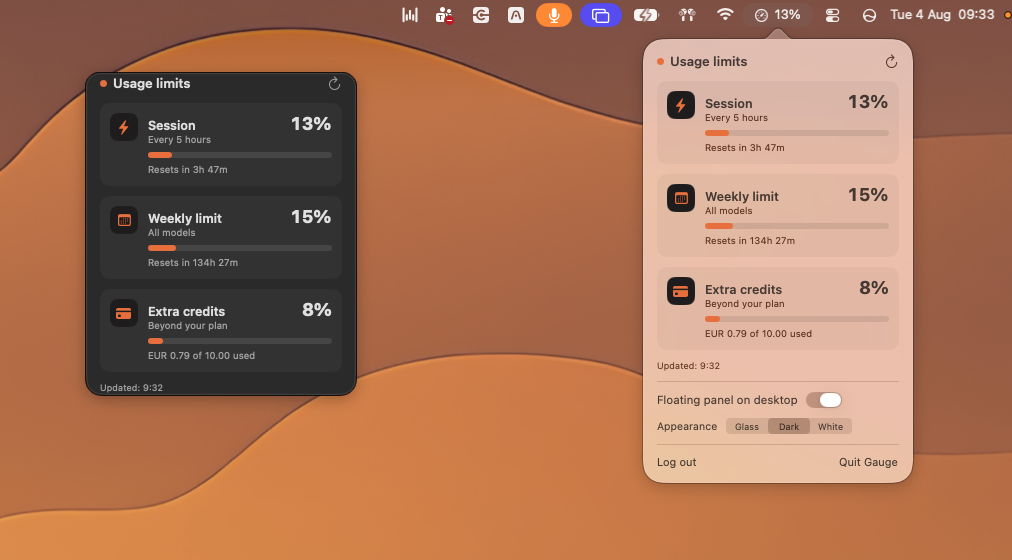
The login puzzle
The trickiest part was getting login right. I wanted people to sign in with their real Claude account, the normal way, with no copying cookies by hand.
The first version worked, until I tried logging in with Google. It turned out Google deliberately blocks sign-in inside any window that isn’t an actual browser, an anti-phishing measure. I tried a few workarounds but each one hit a different wall. In the end, the reliable path was the simplest one: signing in with your email and a one-time code, which works regardless of how your Claude account was originally created. Not as flashy as “Sign in with Google,” but it’s the one door that’s actually open.
Where it stands
Gauge is a work in progress, built for myself first. It’s not on the App Store, partly because it’s still evolving, and partly because it relies on the same internal data Claude’s own website uses to show you your limits, not a public API. That means it could, in theory, stop working if Anthropic changes something on their end. If that happens, I’ll do my best to fix it — no promises, but I’ll try.
What to try it?
DM me on Instagram @lagherika and I’ll send you the download link.
Installing it:
- Download the app from the link I send you
- Open it (first launch, macOS may ask you to confirm – it’s signed and notarized, so no scary warnings)
- Click the gauge icon in your menu bar and log in with your Claude account
- Important: log in using “Enter your email” (you’ll get a one-time code)
⚠️ A small disclaimer: Gauge isn’t an official Anthropic product, and it doesn’t use a public API. It reads the same data your browser sees when you check your usage on claude.ai. That means it could stop working if Anthropic changes something on their end. If that happens, I’ll do my best to fix it.